An ADHD-friendly planner you can open in any browser
Your Ordr lists and Timeline on a bigger screen, with shared lists for the things you plan with other people. Same account as the app, nothing to install.
Or get the app for AI planning and reminders
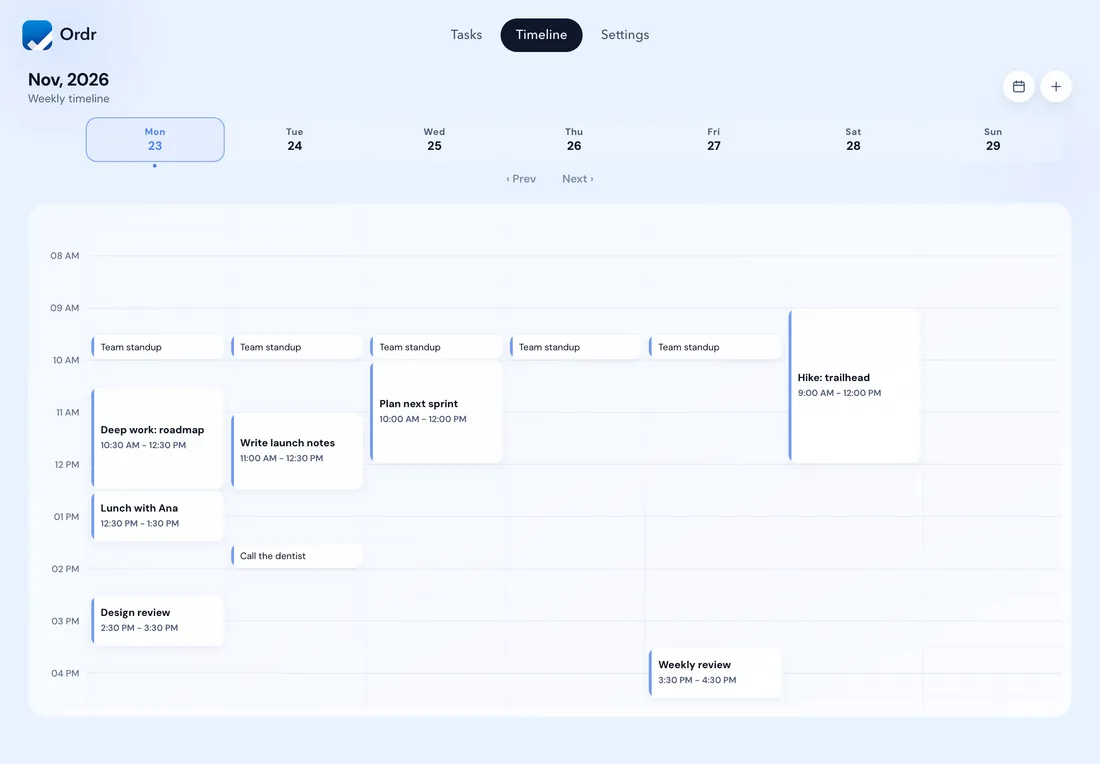
In your browser
What you get on the web
Your lists, on any computer
The same lists and tasks you have on your phone, with room to see more of them at once.
A Timeline you can drag
See your day, two days or a week as a list, in periods, on a calendar grid or on a circular clock. Drag events to reschedule them and set repeats.
Share lists with people
Invite people by email to plan a trip, a move or the weekly shop together. Anyone can join a shared list for free.
One account everywhere
Sign in with the same email, Google or Apple account as the app. There’s nothing to install.
Honest about the edges
What the web app doesn’t do yet
We’d rather tell you now than surprise you later. The web app is newer than the phone app, and we’re building it up with your feedback.
- The full AI planning experience: Free Your Mind, Plan Your Day, Replan Your Day, Match Your Energy and Pick Your Focus live in the mobile app for now.
- Reminders and notifications come from the phone app.
FAQ
Web app questions
Is there a web version of Ordr?
Yes. Sign in at web.useordr.app with the same account you use on your phone to see your lists and Timeline on a bigger screen, add and reschedule events, and share lists with other people.
Is the Ordr web app free?
You can use it for free. Ordr Pro adds unlimited AI actions and the ability to send list invitations; anyone you invite can join a shared list for free.
What can the web app do, and what can’t it do yet?
On the web you can manage your lists and tasks, use the Timeline in list, periods, calendar and circular views, drag events to reschedule them, set repeating events, and share lists. The full AI planning experience (Free Your Mind, Plan Your Day, Replan Your Day, Match Your Energy) and phone reminders are in the Ordr mobile app for now.
How do I sign in?
Use the same email, Google or Apple account you use in the Ordr app, and your lists and Timeline are there. You can also create an account on the web and use it in the app later.
Is my data private on the web app?
Yes. It’s the same account and the same protections as the app: Ordr doesn’t sell personal data or use it for ad targeting, and you can delete your account and data from within the app.
Your plan, wherever you are
Open it in your browser now, or take it with you on your phone.